Vivid POS
A cloud point of sale that lives inside your WooCommerce store. Sell in person on any tablet or browser — products, stock, orders and customers stay perfectly in sync with your website.
Built for real retail
Everything a till needs, nothing it doesn't.
Live WooCommerce sync
Orders, stock and customers flow both ways instantly via the free Vivid POS Connector plugin.
Barcode scanning
Scan to sell, scan to search — with SKU and barcode-first product lookup for big catalogues.
Shifts & cash tracking
Open and close registers, count floats, track cash-ups per staff member per shift.
Split payments & refunds
Cash, card and manual payments in one sale. Full and partial refunds pushed back to Woo.
Offline mode
Keep ringing up sales when the internet drops — everything syncs when you're back online.
Custom receipts
Branded receipts with your logo, printed or emailed via WooCommerce.
Everything Vivid POS does
A real till, running a real shop — not a demo with a card reader bolted on.
🛒 Selling
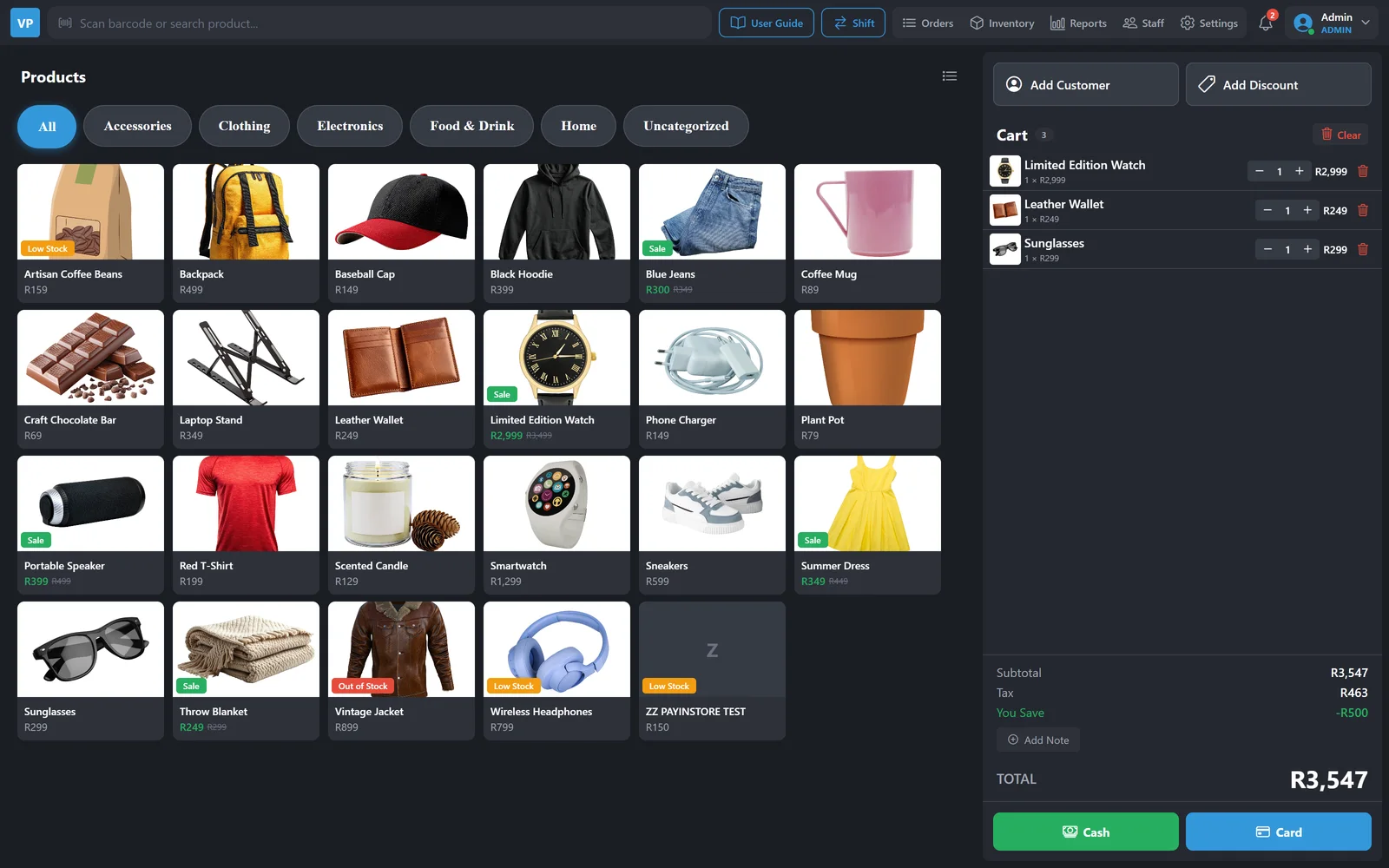
Two-panel checkout
Products one side, cart the other. Built for a tablet and a queue — not for a mouse and a quiet afternoon.
Product photos & variations
Big, tappable product tiles with photos, plus per-variation pricing so size and colour ring up at the right price.
Bold category buttons
Large category tiles to reach anything in a couple of taps, however big the catalogue gets.
Hold & recall orders
Park a sale when someone runs back for milk, serve the next customer, and pick it up again exactly where it was.
Discounts your way
By percentage or rand, on a single line or the whole cart, with the reason recorded against the sale.
Fix the cart fast
Remove a single line without clearing everything. Customer and discount sit at the top of the cart where the cashier's eyes already are.
💳 Taking money
Split payments
Cash, card and manual methods across one sale, with change calculated for you.
Full & partial refunds
Refund a whole order or a single line, with the reason captured — and pushed straight back to WooCommerce.
Shifts & cash-ups
Open with a float, close with a count. Over and short calculated per staff member, per shift, so the drawer reconciles.
Order history
Every sale searchable by number, customer, staff member or date — reprint or refund from the same screen.
Receipt builder
Design your slip — logo, header, footer, VAT number, returns policy — and see it before a roll of paper is wasted.
Print or email
Thermal print at the counter, or email the receipt through WooCommerce. Customer's choice, no extra hardware.
📦 Stock & WooCommerce
One catalogue, both tills
Your WooCommerce products are your POS products. Change a price online and the counter knows immediately.
Stock that stays honest
Sell in-store and the online stock drops. Sell online and the shop floor sees it. One number, not two that drift apart.
Inventory built in
Adjust stock, receive deliveries and correct counts from the POS itself — no laptop, no admin login, no waiting.
Customers both ways
Look up an existing Woo customer at the till, or add one on the spot — their order history follows them either way.
Offline mode
Load-shedding takes the router, not your shop. Keep ringing up sales; everything syncs the moment you're back.
Free connector plugin
One WordPress plugin links your store to the till, and updates itself when we ship improvements.
👥 Staff & insight
Per-store staff PINs
Each staff member has their own PIN, scoped to their store. Every sale, discount and refund carries a name.
Roles & permissions
Cashiers sell; managers refund, discount and see the numbers. Nobody gets a power they shouldn't have.
Analytics dashboard
Takings, best sellers, busiest hours and performance per staff member — so you roster against reality, not a hunch.
Loyalty at the till
A customer's points sit right under their name, so the cashier can offer a reward without leaving the sale.
Notification bell
Low stock, shift reminders and announcements from us, right in the app.
Guide in the app
The full user guide is a tap away on the till, so a new cashier can answer their own question mid-shift.
Every screen, for real
Screenshots of the actual app. You can open the same thing yourself — the sign-in screen has an “Enter Demo Mode” button.
Ring up a sale in two taps
Products on the left, the basket on the right. Big targets, built for a tablet on a counter.
- Filter by category, or scan a barcode straight into the search bar
- Sale prices, Low Stock and Out of Stock badges right on the product tile
- Live subtotal, tax and “You save” as items go in
- Attach a customer and apply a discount before taking payment
- Cash or Card, and a note on the sale if you need one
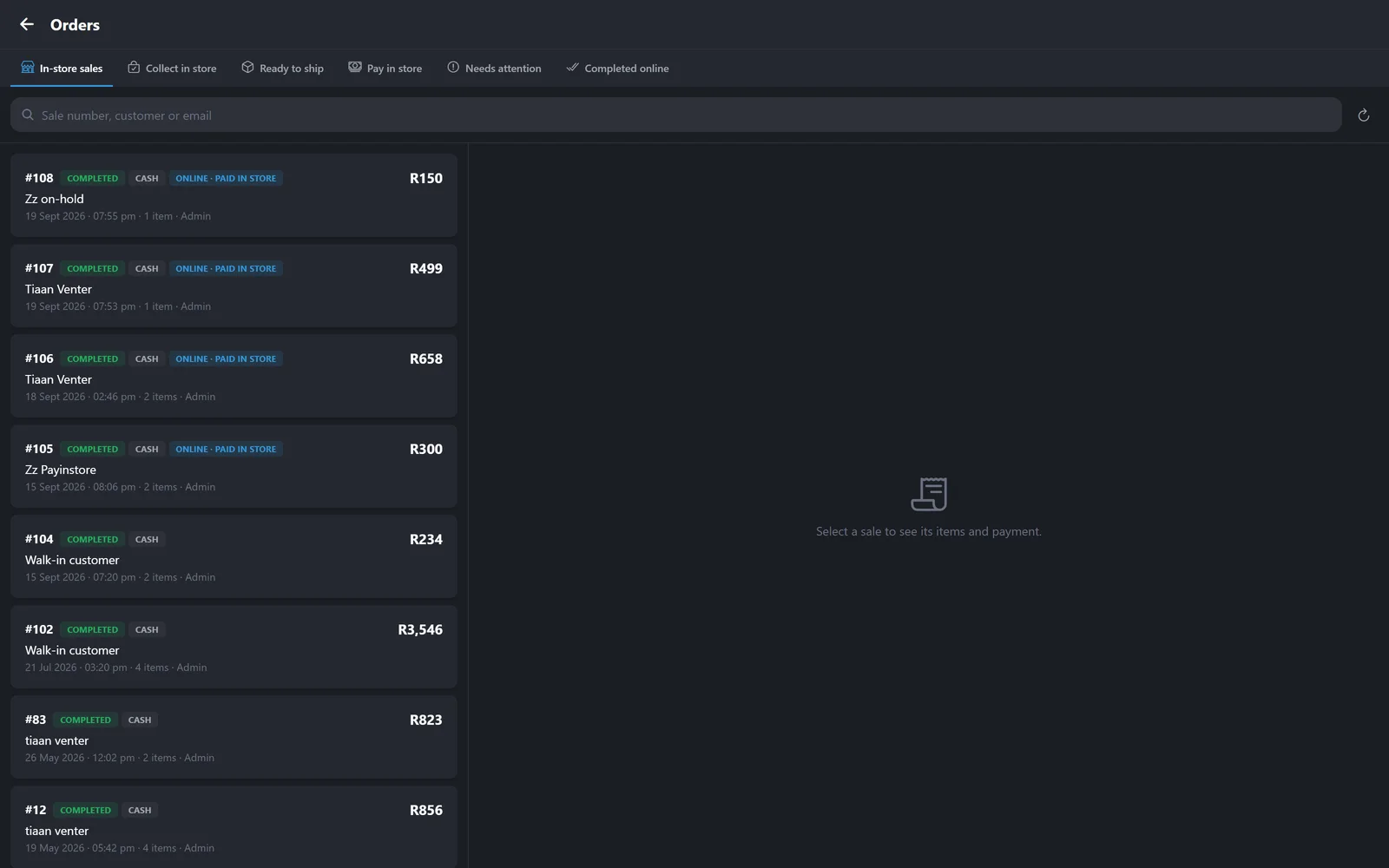
Till sales and web orders in one list
Your online orders arrive at the till, so the counter is not a separate business from the website.
- Tabs for in-store sales, collect in store, ready to ship, pay in store and completed online
- Search by sale number, customer or email
- Payment method and channel shown on every row — including online orders paid in store
- Open any sale to see its items and payment
One stock figure, counter and website
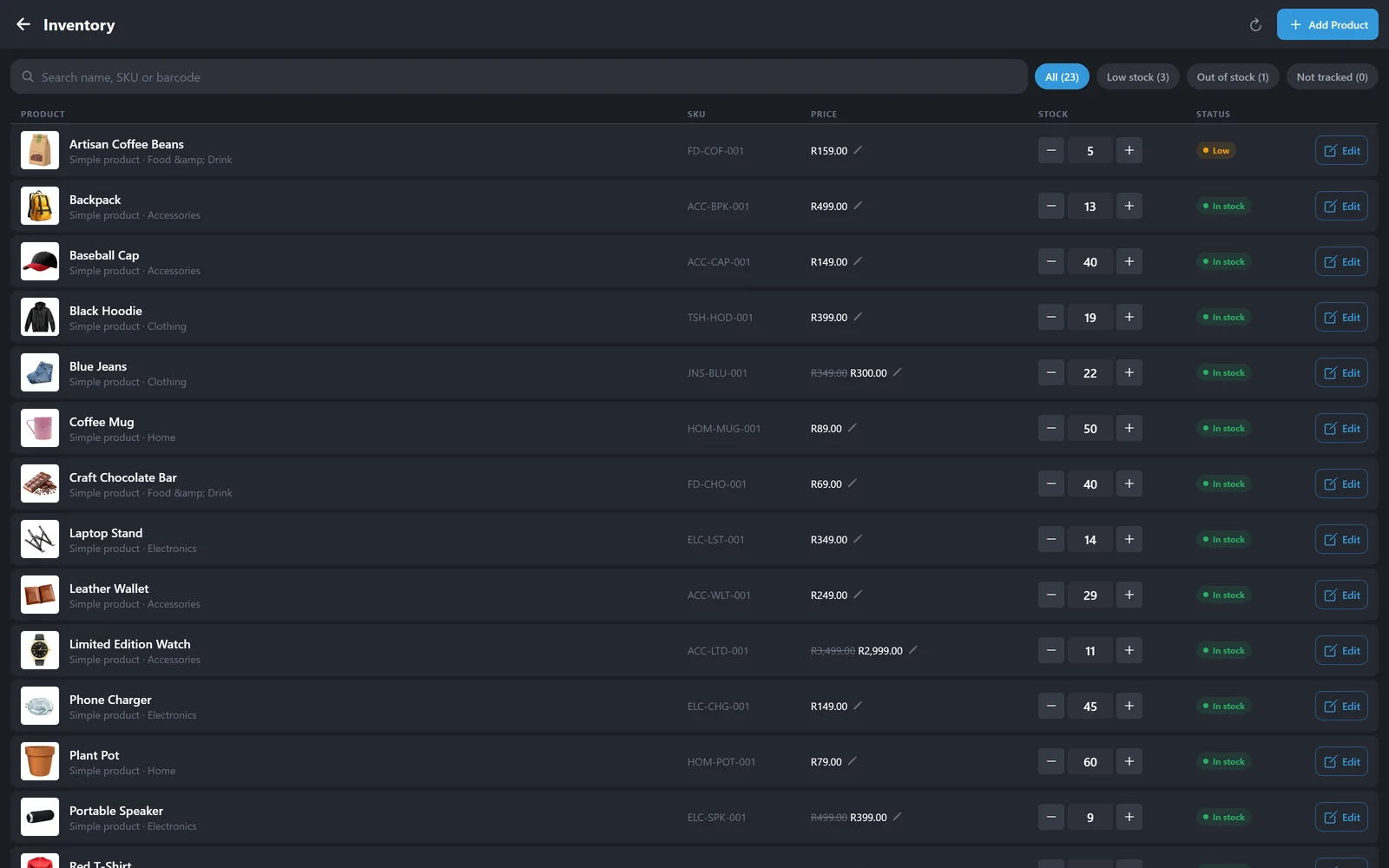
Change the stock at the till and the website knows. Change the price on the website and the till knows.
- Filter to low stock, out of stock, or products not tracked
- Adjust stock with plus and minus, no form to submit
- Edit a price inline, including sale prices
- Search by name, SKU or barcode
- Add a product from the till without opening WordPress
What you actually took, today or this year
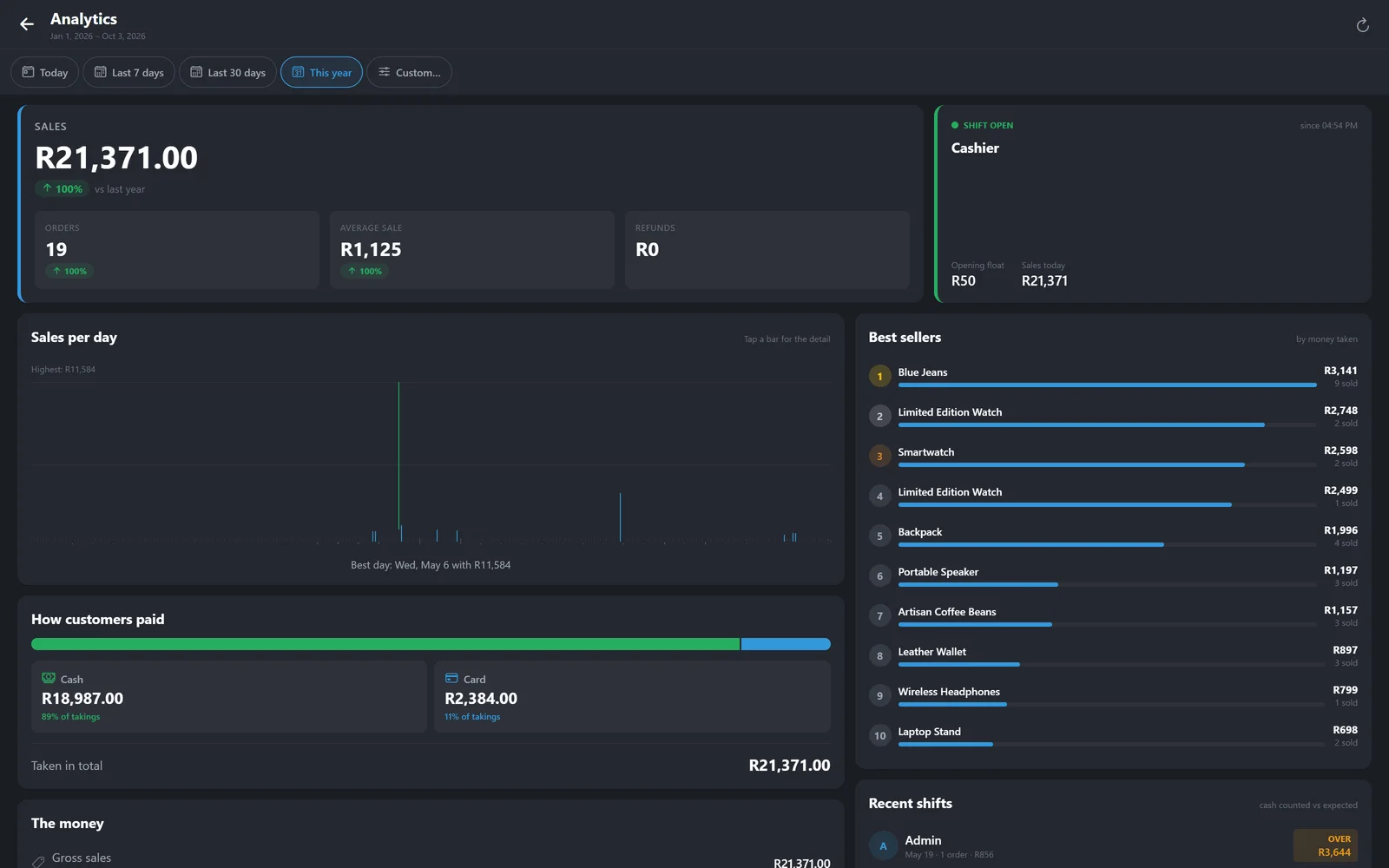
Takings, orders, average sale and refunds, over today, 7 days, 30 days, the year or a range you pick.
- Sales per day, with your best day called out
- How customers paid — cash versus card, in rand and as a share
- Best sellers by money taken, not just units
- Recent shifts with cash counted against expected, so a short till is obvious
- Compared against the same period last year
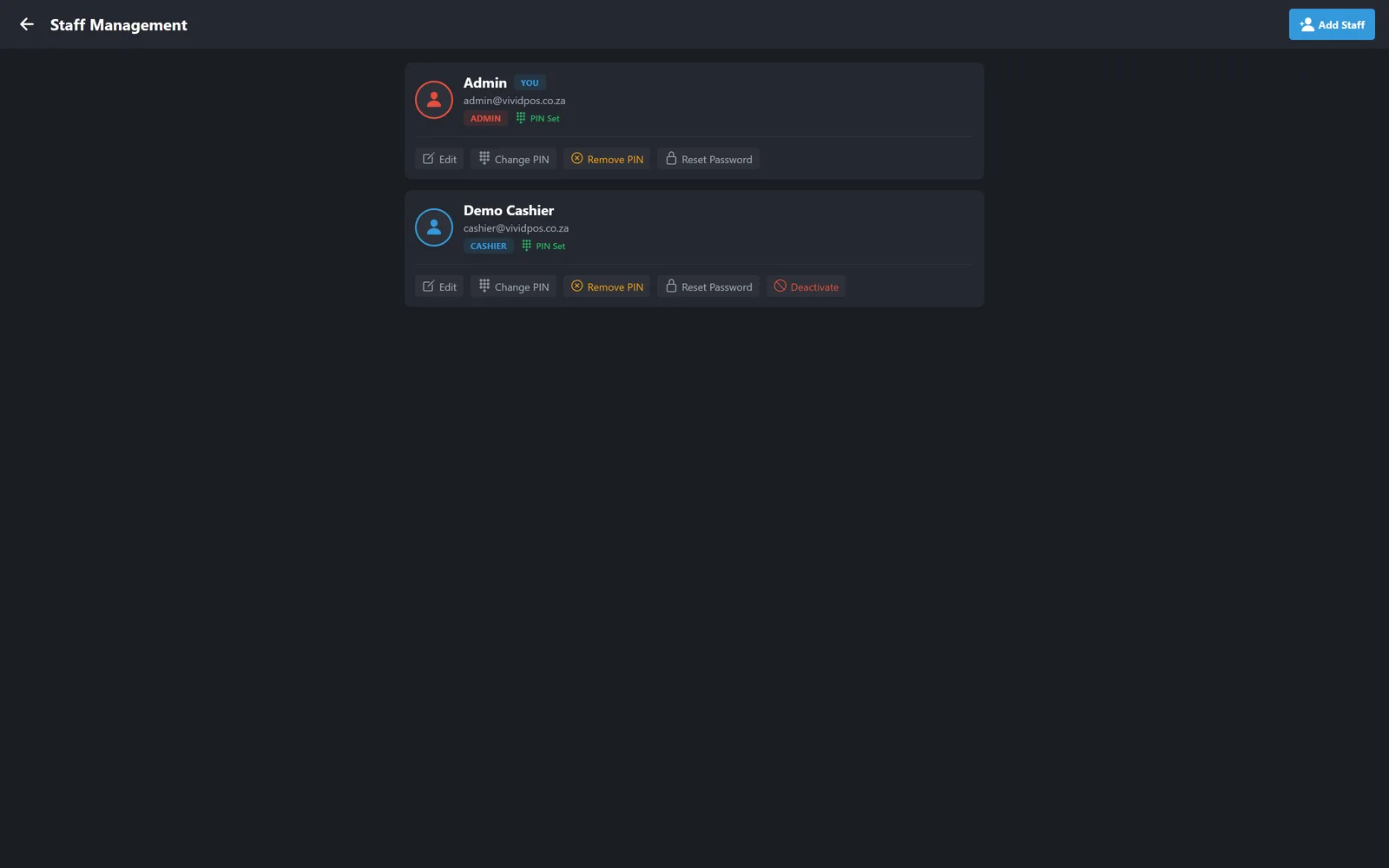
Every sale has a name on it
Admins, managers and cashiers, each with their own 4-digit PIN for switching user at the counter.
- Roles that decide who can refund, discount or see the money
- A PIN per person — scoped to this store, so the same PIN elsewhere is a different person
- Add, edit or deactivate staff without touching WordPress
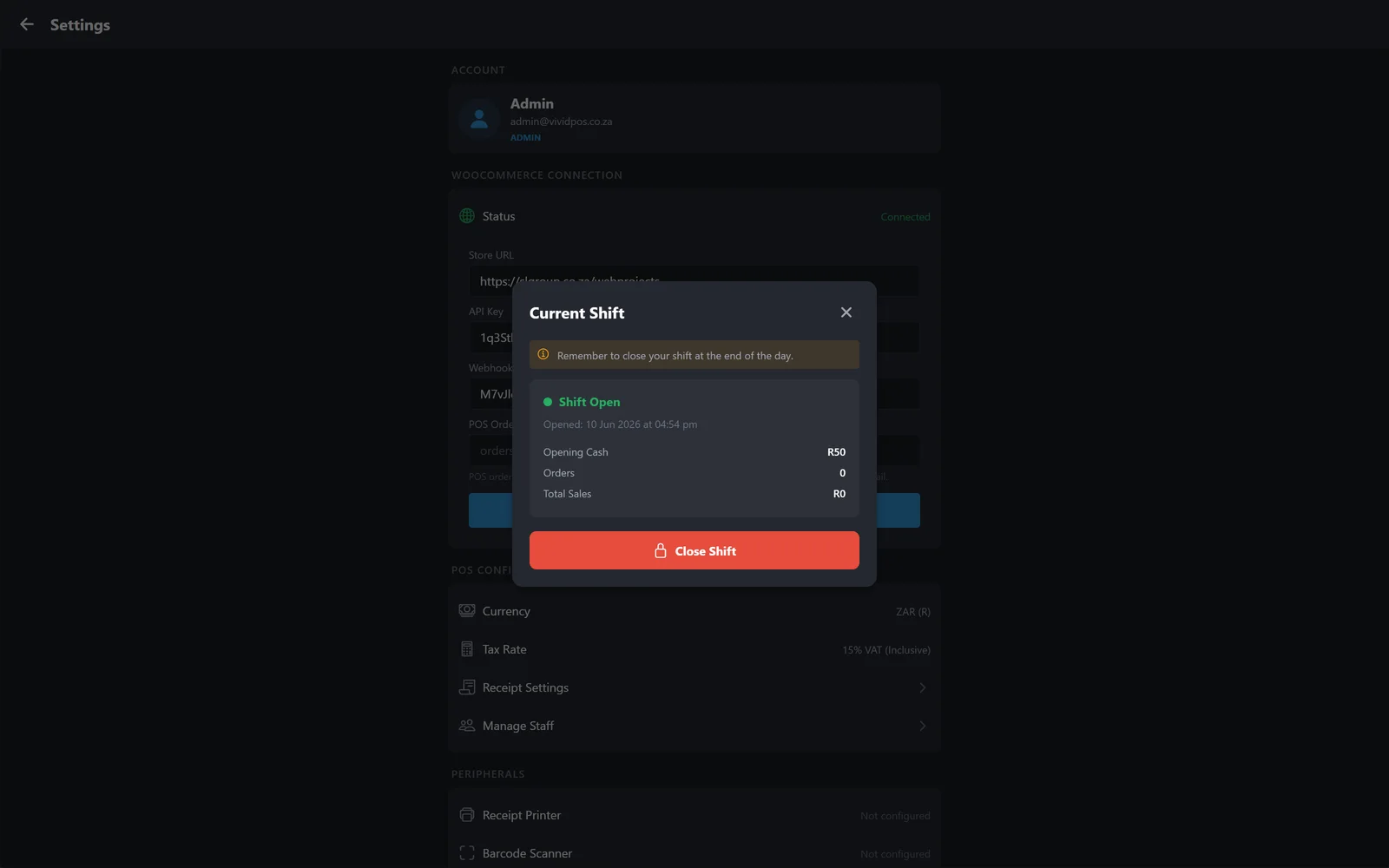
Connected, and you can see that it is
The connection status is on screen, not something you discover is broken mid-sale.
- WooCommerce connection status at a glance
- Your plan and what it includes, with every package side by side
- Receipt, tax and currency settings per store
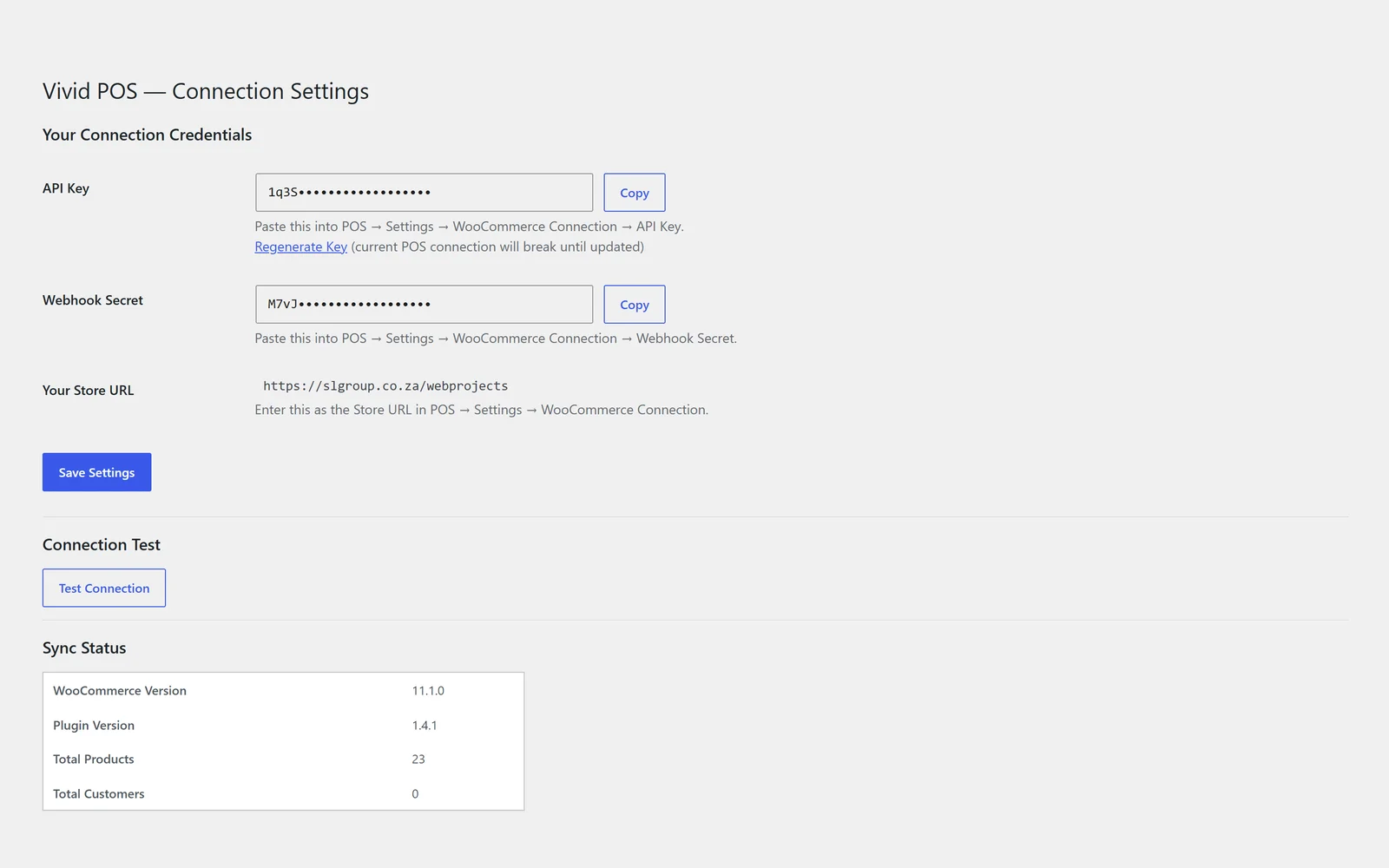
The WooCommerce connector
One plugin on your website, and the till and the online store share the same products, stock and customers.
Copy two keys and you are connected
Install the connector on your WooCommerce site, copy the API key and webhook secret into the POS, and the link is live.
- API key and webhook secret generated for you, each with a Copy button
- Regenerate the key at any time if the wrong person has seen it
- A Test Connection button, so you find out now rather than at the till
- Sync status showing the WooCommerce version, plugin version, and how many products and customers are linked
Pricing
Per store, in Rand, cancel anytime. Annual billing gives you roughly two months free.
Starter
Single device / small shop
or R2,999/year — 2 months free
- 1 POS device (browser/tablet)
- 1 store connection
- WooCommerce sync (orders, stock, customers)
- Barcode scanning
- Basic checkout (cash/card/manual)
- Email receipts & receipt branding
- Daily sales reporting
Growth
Growing businesses
or R4,999/year — 2 months free
- Everything in Starter, plus:
- Up to 3 devices
- Staff accounts & permissions
- Customer management
- Discounts (item & cart level)
- Refunds & low stock alerts
- Weekly & monthly reports
- Priority sync speed
Pro
Retail operations
or R7,999/year — 2 months free
- Everything in Growth, plus:
- Unlimited devices
- Shift management & cash tracking
- Hold / park orders
- Split payments
- Advanced inventory controls
- Offline mode
- Priority support
Business
Multi-store operations
or R14,999/year — 2 months free
- Everything in Pro, plus:
- Up to 5 WooCommerce stores
- Central dashboard & cross-store reporting
- Stock sync between stores
- Premium support
Agency
Resellers / white-label
or R49,999/year — 2 months free
- Everything in Business, plus:
- Unlimited client stores
- White-label — clients see your brand
- Central license control & onboarding tools
- Priority infrastructure
Add-ons
Put a till in your WooCommerce store
Install the free connector, pick a plan, and start selling in person today.
Start with Vivid POS